Engineering case study
UMKM Toolkit
A practical mobile toolkit for everyday small-business operations.
Overview
UMKM Toolkit is an independent Android application for small business owners. The supplied interface materials show a mobile-first set of tools for product costing, selling-price planning, stock tracking, customer balances, and invoices.
The product brief describes local data storage and no mandatory user account. The folder provided for this case study contains screen concepts and a design specification; it does not include the Android application source code, so implementation architecture cannot be confirmed from these files.
Context and design goal
The concept is shaped around day-to-day work in a small shop or food business: entering ingredient costs, setting prices, checking stock, and keeping track of customer or supplier balances. Its goal is to make those tasks approachable on a phone without hiding important amounts or status information behind abstract charts or gestures.
The supplied design document explicitly prioritizes clear Bahasa Indonesia labels, large touch targets, one-handed reach, and readable financial values. These are documented design goals, not usability-test results.
Product scope
The product scope supplied for this case study includes the following capabilities. The accompanying screens illustrate selected flows; they are not proof that every screen or action is implemented in a released application.
- HPP (cost-of-goods) and selling-price calculations
- Marketplace price planning that accounts for fees, discounts, packing, and profit targets
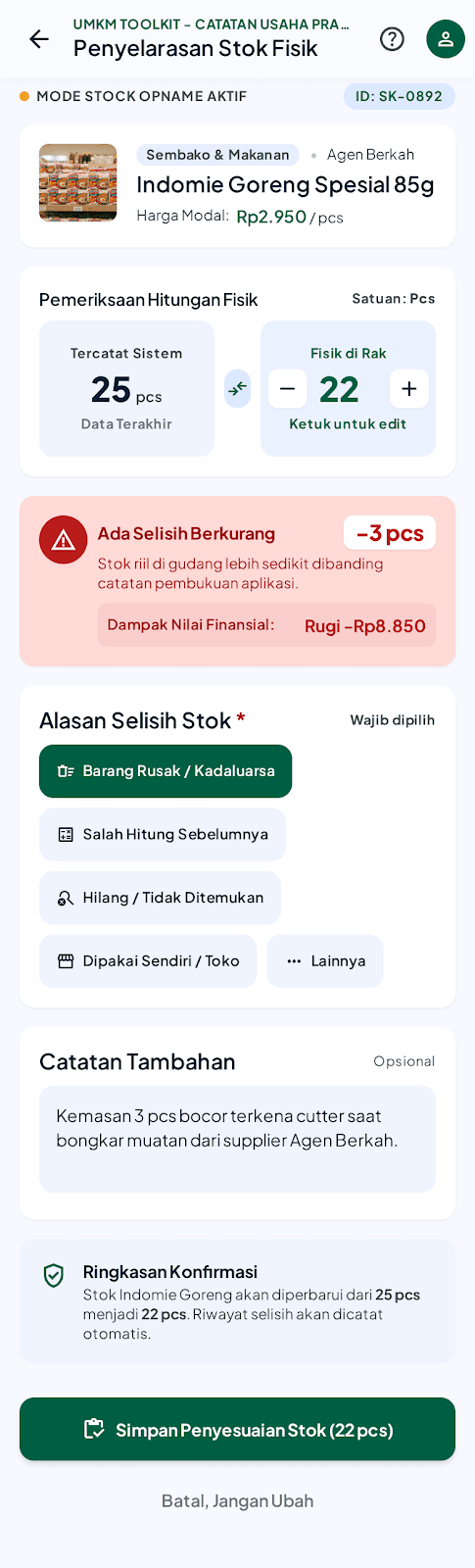
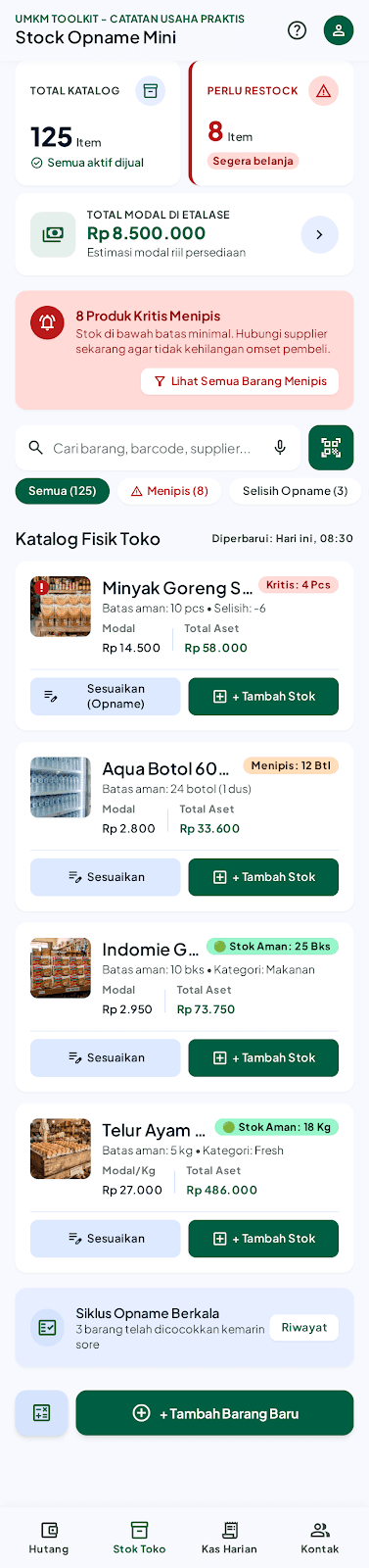
- Stock management and physical stock-opname adjustments
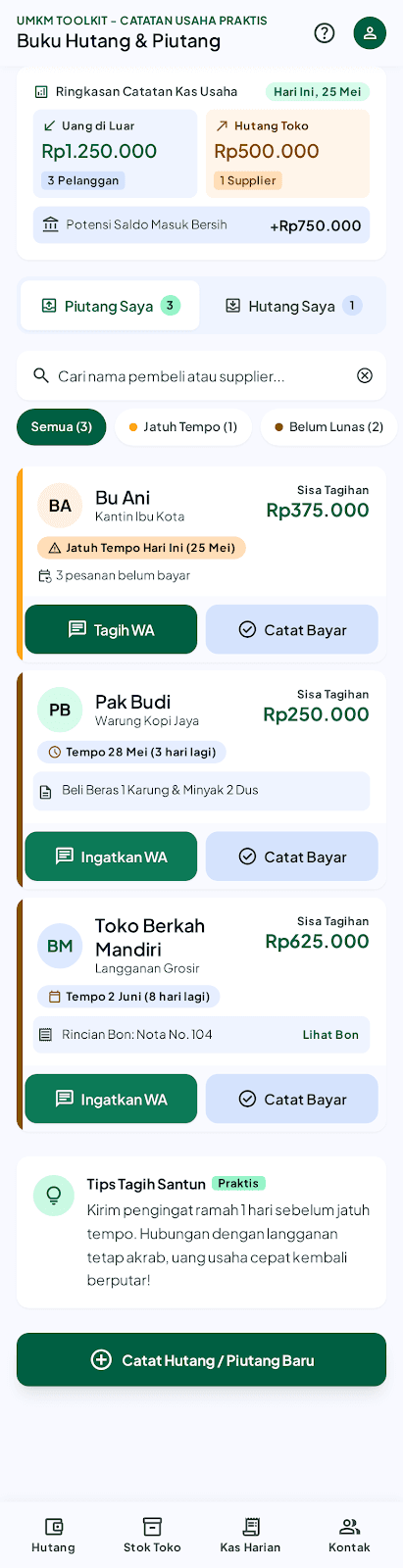
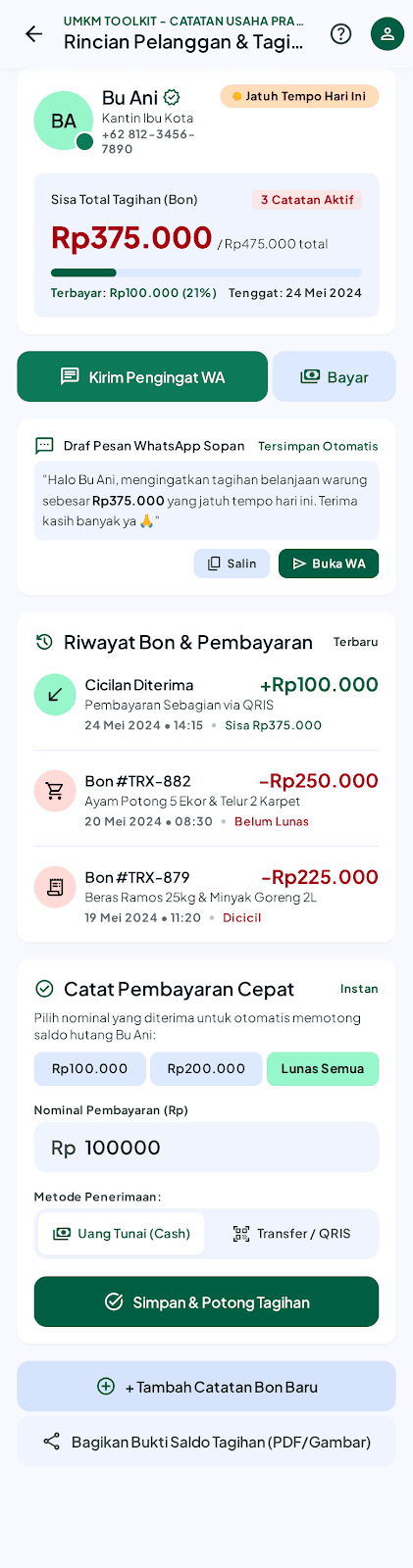
- Debt and receivables tracking, including due dates and payment records
- Invoice or cash-note generation and sharing workflow
Key workflows shown in the screens
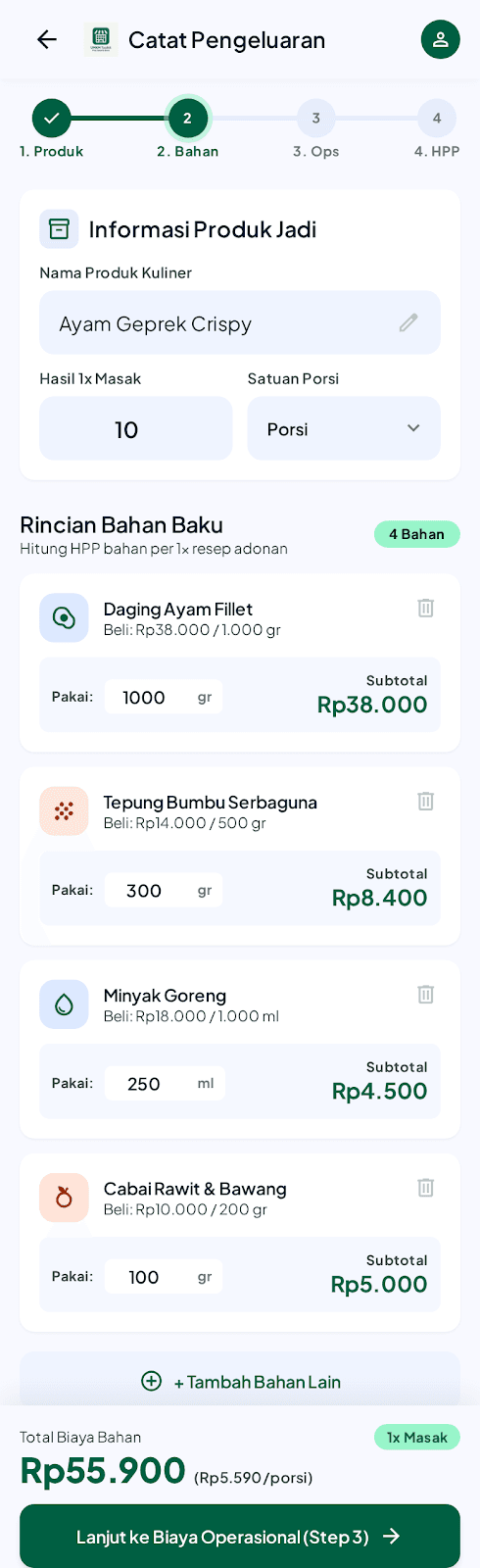
- HPP entry groups a finished product, recipe yield, ingredient quantities, and ingredient costs before moving to operating costs and a calculation summary.
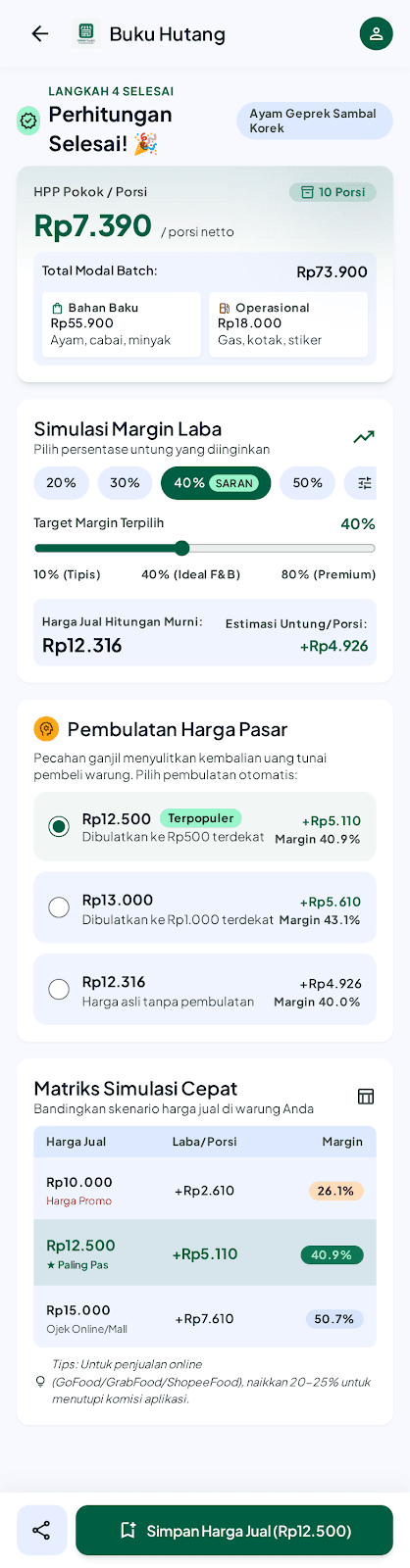
- The margin result concept compares target margins and rounded selling-price options, then presents per-unit profit and a quick comparison table.
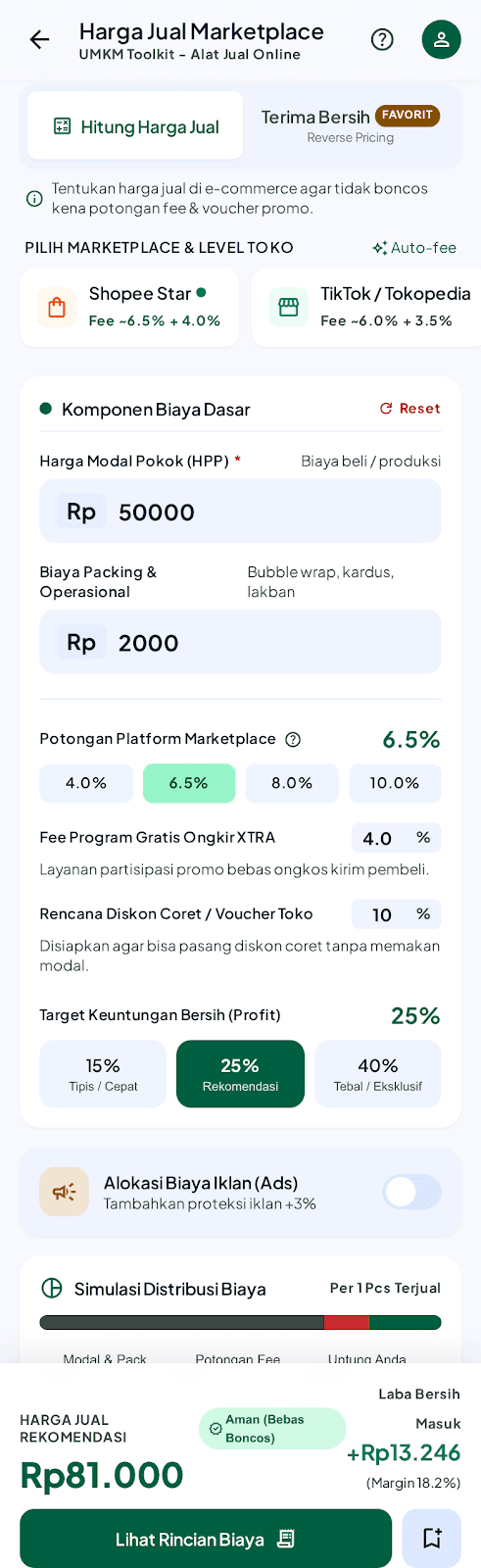
- Marketplace pricing screens let a seller consider platform and program fees, store discounts, packing costs, and a target net amount or profit.
- Stock screens surface low-stock items and guide a physical count adjustment, including a reason for the discrepancy and its estimated cost impact.
- The debt ledger and customer detail concepts show outstanding balances, due dates, partial payments, transaction history, and a prepared WhatsApp reminder.
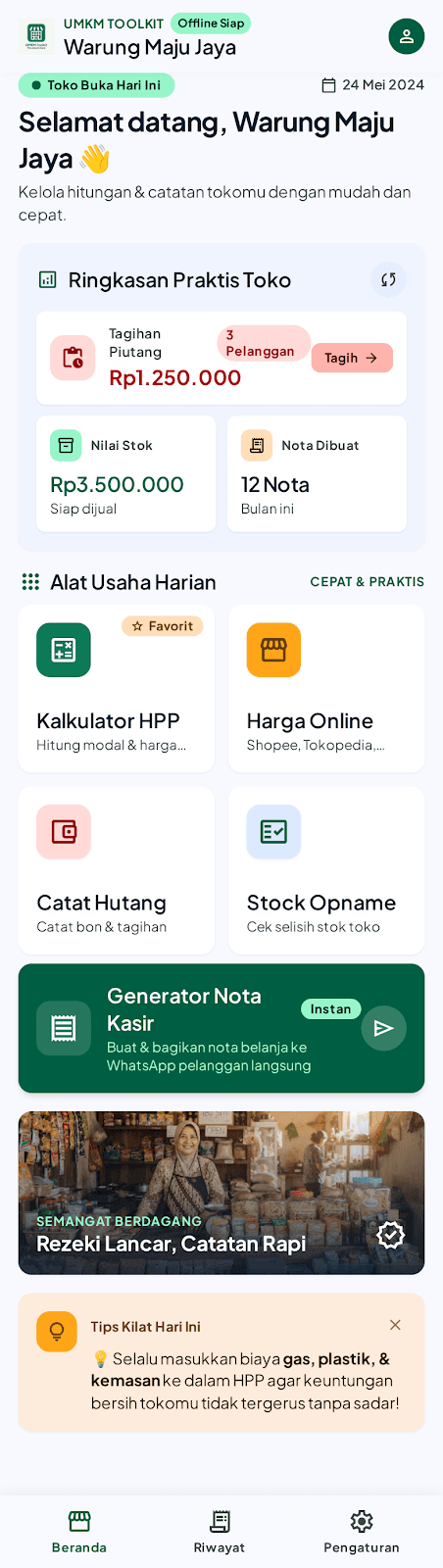
- The dashboard groups shortcuts to common tools and presents a compact view of stock, notes, and receivables.
Interaction and visual decisions
The visual system uses forest green for primary actions and positive cash flow, amber for caution states such as low stock, and red for overdue balances or destructive actions. Plus Jakarta Sans is used throughout, with tabular numerals specified for financial values so amounts stay aligned while scanning.
The design specification calls for 48-pixel minimum touch targets, bottom-anchored primary actions, labeled controls, and bottom sheets for focused tasks. Rounded cards, clear status chips, and direct labels are intended to keep dense operational screens legible on small phones.
Data handling and offline intent
The product brief describes local data storage and no mandatory account. The home-screen concept also displays an “Offline Siap” status. Together, these establish an offline-oriented product intent; they do not establish backup, synchronization, encryption, or recovery behavior.
The exact local database, domain model, migration strategy, and data-protection implementation are not present in the supplied design package and are intentionally left unspecified.
Prototype boundaries and sample data
The provided folder contains mobile screen mockups and a visual design specification, not Android source code or a runnable build. Screens demonstrate the intended information hierarchy and user flows, but their interactive behavior has not been verified here.
Names of shops and customers, dates, balances, stock counts, prices, fee percentages, and profit examples visible in the mockups are sample interface content. They should not be treated as actual users, transactions, current marketplace rates, or measured business outcomes.
Engineering questions for the next iteration
- Define and test the calculation rules for HPP, marketplace costs, discounts, and margin rounding.
- Document the local data model, persistence technology, backup and restore behavior, and handling of device loss.
- Verify whether the designed flows, WhatsApp handoff, invoice sharing, and stock adjustments exist in the Android implementation.
- Validate touch-target sizing, readability, and task completion on representative Android devices with intended users.
Project gallery
The following images come from the visual materials available for this project. Each case study explains the limits and status of the information shown.
Have a similar challenge?
Let's explore the right solution.
Tell us about the problem you’re working through and we can discuss a practical next step.
Discuss a project ↗